A migration moves your data. The next 90 days decide whether your team actually moves with it.
The Moment That Decides the Outcome
The data is in. The workflows are live. The old system is (almost) switched off. Everyone exhales.
We’ve been part of dozens of Zoho migrations, and this is the moment we’ve learned to pay the most attention to. Not because something is broken, but because this is where the real outcome gets decided.
In earlier posts we covered what to prepare before a migration. This one picks up where those left off: what the first 90 days after go-live should look like, and what your side of the table needs to own to make them count.
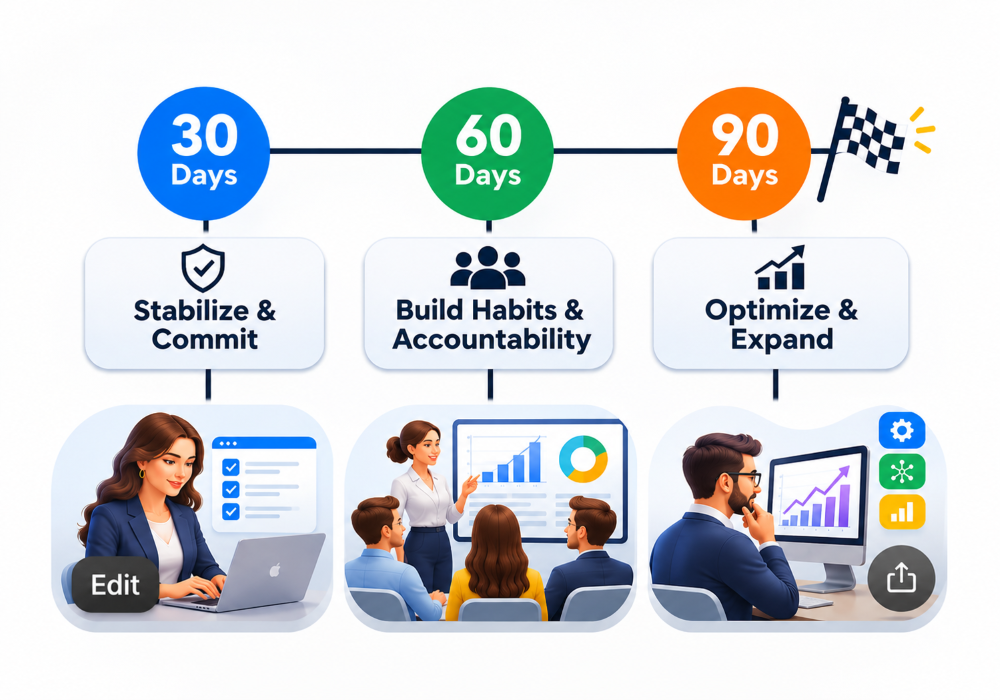
Days 1-30: Stabilize and Commit
The first month is about one thing: making the new system the only place where work happens. Comfort with the old way is the biggest risk right now, not bugs.
One client, a service business with around 20 users, kept their old CRM open in read-only mode “just in case.” Within two weeks, half the team was checking it first and entering notes in Zoho later, if at all. Nothing was technically wrong with the setup. The team simply had a way out, and they used it.
What to focus on:
- Set a hard cutoff date for the old system. Read-only access for reference is fine for a short, defined period. After that, archive it.
- Retire the “side spreadsheets.” If someone is still tracking deals or orders in Excel, find out why. Usually it points to a missing field, view or report we can add.
- Log every question and issue in one place. A shared list beats scattered emails and hallway questions. It also shows us patterns worth fixing.
- Check data quality weekly. Are required fields filled in? Are records assigned to the right owners? Small gaps now turn into reports nobody trusts later.
- Have leadership use the system visibly. When managers ask “is it in Zoho?” instead of “can you send me an update?”, adoption follows fast.
Signs you’re on track: the team logs in daily, questions shift from “where do I click?” to “can it also do this?”, and nobody is asking for the old system anymore.
Days 31-60: Build Habits and Accountability
By month two, the initial training glow has faded. This is where we most often see momentum stall, and it almost always comes down to accountability on the client side.
Training teaches people how to use the system. It can’t make them use it. That part belongs to the business. In one manufacturing company we worked with, the training sessions went great. Everyone was engaged. But no one internally was responsible for follow-through, and six weeks later the sales pipeline in Zoho was a partial picture at best.
What to focus on:
- Run your meetings from Zoho. Weekly sales, operations or finance meetings should use live dashboards and reports, not slides built from exports. If it’s not in the system, it doesn’t get discussed.
- Make usage part of the job. Clear expectations help: every lead logged, every deal updated before the weekly meeting, every invoice created in Zoho Books.
- Hold short refresher sessions. Real questions come up after people start working in the system. A focused 30-minute session in week five or six is often more valuable than the original training.
- Gather feedback in a structured way. Ask each team what slows them down. Bring it to us in batches, so changes are planned rather than reactive.
- Give feedback on time. When we send something for review, quick answers keep improvements moving. A week without a response means a week of your team working around a gap.
Signs you’re on track: managers trust the reports enough to make decisions from them, and the team brings improvement ideas instead of workarounds.
Days 61-90: Optimize and Expand
Once the basics are solid, the system can start working harder for you. This is the phase where the investment begins to pay back.
What to focus on:
- Automate what’s now predictable. After two months of real use, it’s clear which tasks repeat. Follow-ups, assignments, reminders and approvals are good candidates for workflows or custom Deluge automation.
- Refine reports and dashboards. Early reports are a starting point. Now you know which numbers your team actually looks at and which ones nobody opens.
- Clean up what isn’t used. Unused fields, layouts and views add noise. Removing them makes the system faster to work in.
- Plan the next step. Maybe it’s connecting Zoho Books with CRM, adding Zoho Desk for support, or rolling out to another department. Decide based on what the first 90 days showed you.
- Review the original goals. Go back to why you migrated in the first place. Are those problems solved? What’s still missing?
Signs you’re on track: the conversation has shifted from “getting people to use it” to “what else can we do with it.”
Who Owns This on Your Side?
Every successful post-migration period we’ve seen had one thing in common: someone inside the business owned it. Not the consultant. Not IT by default. A person with the time, authority and interest to keep things moving.
We call this person the internal Zoho champion. They don’t need to be technical. They need to:
- Be the first point of contact for team questions
- Make or quickly escalate decisions about changes
- Keep an eye on data quality and usage
- Meet with us regularly to review progress and priorities
When this role is missing, every small question becomes a support ticket, decisions wait for weeks, and the system slowly drifts away from how the business works. When it’s filled, the first 90 days usually go faster than anyone expected.
Where to Go From Here
Ninety days isn’t a magic number. Some teams settle in faster, others need longer. What matters is that the period after go-live is planned and owned, not left to chance.
If you take only three things from this post: name the person on your team who owns the system, set a date to switch off the old one, and start running your meetings from Zoho. Those three steps alone change how the first months go.
Planning a migration, or just finished one? Talk to our team about what your first 90 days should look like.